The SharePoint Combo Button: Streamlining SharePoint List Operations
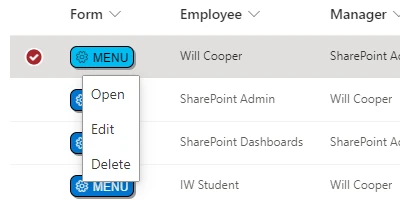
Efficient task management and employee oversight are crucial components of a successful business operation. In this digital era, tools like SharePoint have become indispensable in organizing and managing information. Among the myriad of tools and features SharePoint offers, the **SharePoint Combo Button** stands out for its ability to simplify user interactions with SharePoint lists by consolidating oft-used list operations-such as Edit, View, and Delete-into a single, easily accessible button. Here, we'll explore how this feature integrates with various SharePoint functionalities, streamlines Human Resources processes, and can be effortlessly implemented through a template provided at
SharePoint Dashboards.
Enhancing Charting and Visual Status Indicators
Managing large datasets often requires visualization for better analysis and interpretation. Charting and visual status indicators are vital tools in this context. The **SharePoint Combo Button** complements these by cleaning up the interface and reducing the clutter surrounding list operations. Users can engage more effectively with data visualizations and status indicators without unnecessary navigational hurdles. By reducing the cognitive load through streamlined menu options, users can focus more on data interpretation rather than data management.
Task Management and Employee Tracking Simplified
Task management involves keeping track of numerous assignments, deadlines, and progress statuses. The **SharePoint Combo Button** assists in simplifying these tasks by providing quick access to commonly used operations. For instance, project managers can swiftly edit task details or view additional information with a single click, thereby increasing productivity and reducing time spent on administrative tasks. This streamlined approach also aids in employee tracking as HR professionals or team leads can quickly update and access records without sifting through complex interfaces.
Integration with Human Resources Processes
Human Resources departments handle sensitive and extensive information that requires regular updating and access. The **SharePoint Combo Button** becomes a valuable tool in HR processes by facilitating quick and efficient data management. Whether it is updating employee records, viewing performance reviews, or deleting obsolete records, this button enhances the user experience by offering these frequently used actions in a less cumbersome manner. This ease of use aligns with HR's need for precision and efficiency in managing confidential information.
Implementing the SharePoint Combo Button: A Seamless Integration
Setting up the **SharePoint Combo Button** is remarkably straightforward, requiring only basic SharePoint skills. By visiting
SharePoint Dashboards, users can access a template that simplifies the setup process. The steps are as follows:
- Create a column in your SharePoint list to house the button.
- Copy the template provided.
- Paste it into the column settings of your list.
This simple yet powerful enhancement can lead to significant improvements in productivity and user satisfaction. With compatibility across nearly all SharePoint lists, integrating this tool into your workflow is both versatile and repeatable.
Use Case Scenarios
The application of the **SharePoint Combo Button** can be demonstrated through a variety of scenarios:
- Project Management: A project manager can quickly access task records and update progress directly from the list view without navigating through multiple screens.
- Inventory Management: Warehouse staff can manage stock levels and swiftly log inventory updates or discrepancies, ensuring real-time data accuracy.
- Customer Relationship Management (CRM): Sales teams can instantly update customer interaction logs and access client information seamlessly during calls.
SharePoint JSON Formatting and Customization
SharePoint allows extensive customization through JSON formatting, a key aspect of implementing templates like the **SharePoint Combo Button**. By applying a JSON template to a SharePoint list view, users can define custom functionalities and visual appearances of list elements. This approach not only enhances functionality but also elevates aesthetic appeal, ensuring data is not only accessible but also visually coherent and intuitive.
Through JSON formatting, organizations can apply the **SharePoint Combo Button** template to their specific SharePoint setup swiftly, adapting to unique operational needs while maintaining the core usability that the button offers.
Conclusion
The **SharePoint Combo Button** is an excellent resource for businesses looking to optimize their SharePoint list interactions. By simplifying the most common list operations into a single clickable button, companies can streamline task and employee management, enhance HR processes, and make data visualization more accessible. Implementing this tool is simple with the template from
SharePoint Dashboards, making it an easy addition to any SharePoint-based system. By adopting this tool, organizations can ensure their SharePoint resources are used to their fullest potential, thereby increasing productivity and operational efficiency.